

Why You Should Use ThemeVerify as Your WordPress Theme Detector
Wordpress Theme Detectror
March 07, 2026

Have you ever visited a beautiful WordPress website and wondered, “What theme is this site using?” Whether you're a developer, blogger, designer, or digital marketer, identifying the theme and plugins behind a successful website can save you hours of research and inspire your next project.
This is where ThemeVerify comes in.
ThemeVerify is a powerful WordPress theme detector tool designed to help you instantly discover which theme and plugins a website is using. In this guide, we’ll explore why you should use ThemeVerify as your go-to WordPress theme detection tool and how it can benefit your workflow.
What Is ThemeVerify?
ThemeVerify is an online WordPress theme and plugin detection tool that allows users to:
Detect the WordPress theme used on any website
Identify active plugins
Discover theme author details
View version information (when available)
Analyze site technology stack
Instead of manually inspecting source code or using complicated developer tools, ThemeVerify simplifies the process into a single search.
All you need to do is enter a website URL — and the tool does the rest.
Why You Should Use ThemeVerify
1. Instantly Detect Any WordPress Theme
Manually checking a theme requires digging into a website’s source code, searching for stylesheet links, and identifying theme directories. That’s time-consuming.
ThemeVerify automates this entire process.
Within seconds, you can discover:
Theme name
Theme author
Theme version
Official website (if available)
This is especially useful for:
Web designers looking for inspiration
Developers researching competitor sites
Agencies auditing client websites
2. Identify WordPress Plugins Used on a Website
Themes are only part of the equation. Plugins power most WordPress functionality.
ThemeVerify helps you detect:
SEO plugins
Security plugins
Page builders
Caching plugins
Analytics tools
E-commerce plugins
If you’re trying to replicate certain functionality (like popups, sliders, forms, or speed optimization), knowing which plugins are being used can give you a major advantage.
3. Save Hours of Manual Research
Without a theme detector, you would need to:
Inspect HTML source code
Search through CSS files
Analyze network requests
Guess plugin footprints
ThemeVerify removes all that technical guesswork.
Instead of spending 20–30 minutes analyzing one website, you get results in seconds. Over time, this can save dozens of hours.
4. Perfect for Competitor Research
If you're in digital marketing, SEO, or web development, competitor analysis is essential.
ThemeVerify helps you answer questions like:
What theme is my competitor using?
Are they using a premium theme?
Which SEO plugin powers their site?
Are they using a specific page builder?
This information helps you:
Improve your own website setup
Choose better-performing tools
Stay competitive in your niche
5. Great for Beginners and Non-Technical Users
Not everyone knows how to inspect source code.
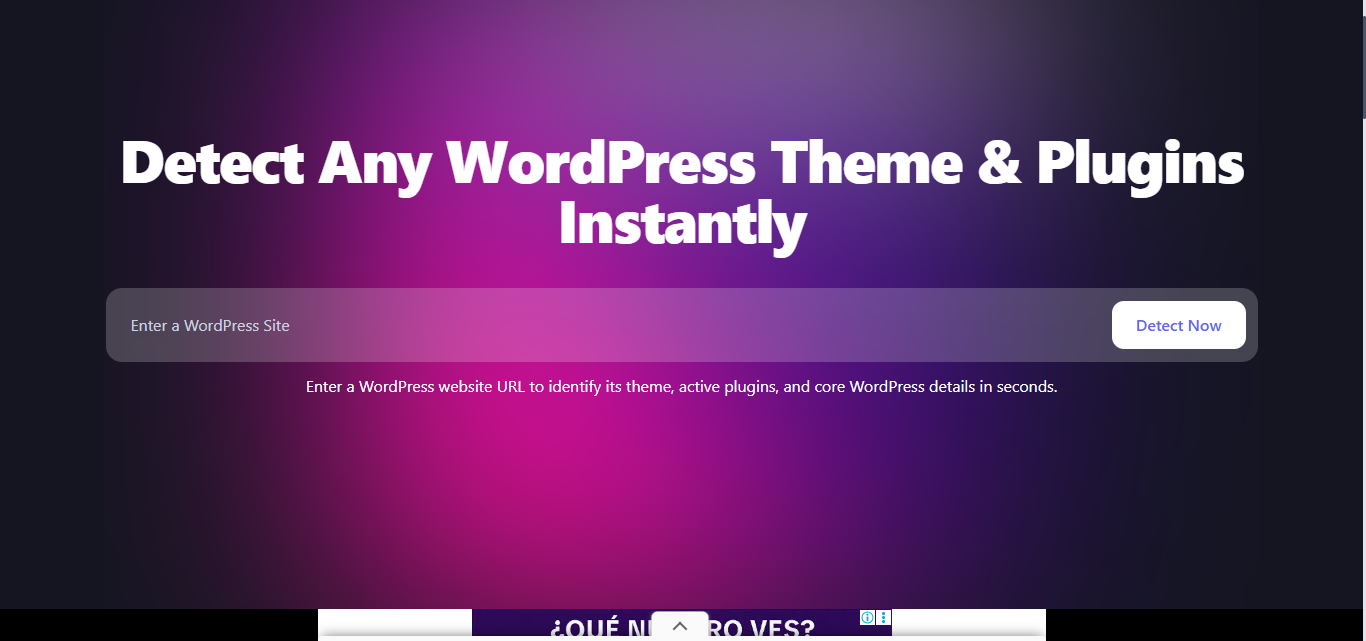
ThemeVerify is beginner-friendly and requires zero technical knowledge. You simply:
Visit the tool
Enter the website URL
Click detect
View results instantly
No coding skills required.
6. Helps You Find Premium Themes
Sometimes you come across a stunning website and want to know if it’s built with:
A custom theme
A premium marketplace theme
A popular framework like Astra or GeneratePress
ThemeVerify helps you identify whether the theme is publicly available. If it is, you can easily purchase or download it for your own project.
This is especially useful for:
Freelancers
Agencies
Startup founders
Bloggers
7. Improve Your WordPress Knowledge
Using a theme detector regularly exposes you to:
Popular WordPress themes
Common plugin stacks
Industry trends
Performance tools
Over time, this builds your expertise in WordPress technology.
You begin to recognize patterns such as:
Which themes are popular in eCommerce
Which plugins dominate SEO
Which builders are most commonly used
This knowledge gives you an edge.
8. Fast, Simple, and Free
One of the biggest advantages of ThemeVerify is accessibility.
There’s no need to:
Install browser extensions
Create an account
Download software
Pay subscription fees
Just enter the URL and get results.
For freelancers and small businesses, this makes ThemeVerify a cost-effective research tool.
Who Should Use ThemeVerify?
ThemeVerify is ideal for:
WordPress developers
Bloggers
Digital marketers
SEO specialists
Web designers
Agencies
Students learning WordPress
If you work with WordPress in any capacity, having a reliable theme detector in your toolkit is essential.
How to Use ThemeVerify Effectively
To get the most out of ThemeVerify:
Use it for competitor analysis
Analyze top-ranking websites in your niche
Study successful eCommerce stores
Research blog layouts you admire
Compare plugin stacks across industries
Combine this data with performance testing tools to fully understand how high-performing sites are built.
Is ThemeVerify Better Than Manual Detection?
Manual detection works — but it’s inefficient.
ThemeVerify offers:
Speed
Accuracy
Convenience
Simplicity
Unless you need deep-level debugging, there’s no reason to manually scan code when a specialized tool can provide instant results.
Final Thoughts
In today’s competitive digital landscape, understanding how websites are built gives you a serious advantage.
Whether you’re designing your next website, researching competitors, or learning WordPress development, ThemeVerify simplifies the entire theme and plugin detection process.
Instead of guessing or digging through code, you get fast, reliable insights with minimal effort.
If you regularly work with WordPress, using ThemeVerify as your WordPress theme detector is not just helpful — it’s essential.









Detectors
We do not sell your email. We do not spam.